Friday, May 29, 2020
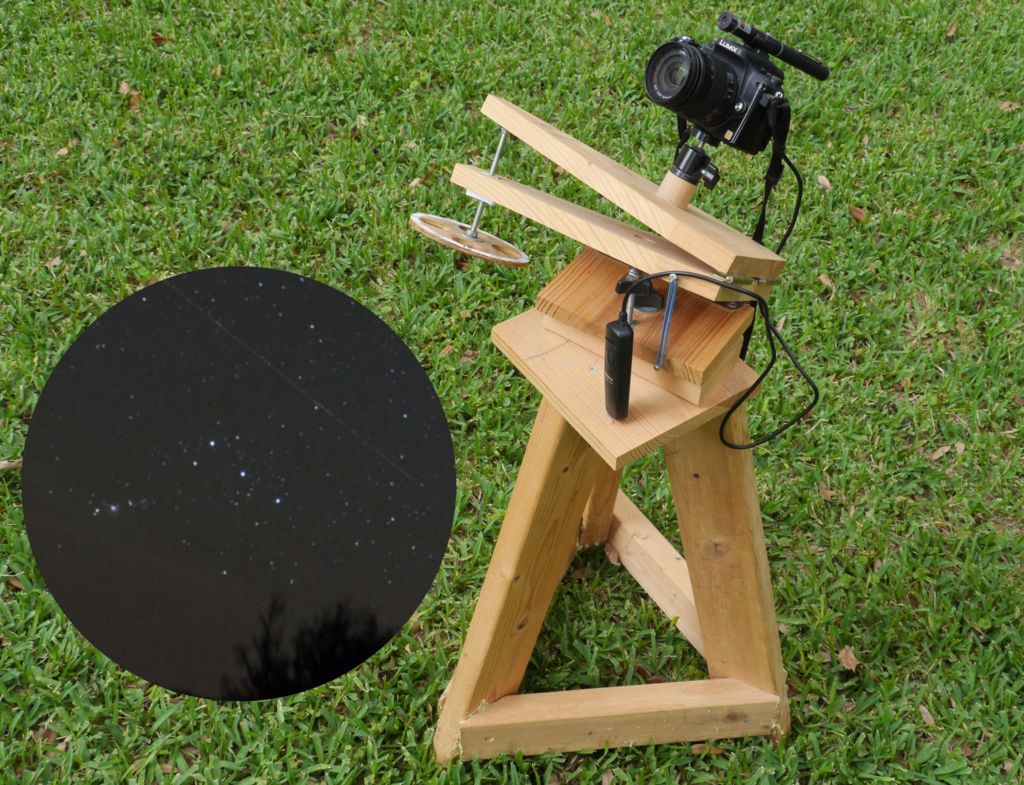
Barndoor tracker
My Instructable for a simple manual star tracker for astrophotography is now up (and a finalist in the Space contest). The idea is that you manually rotate a knob together in sync with a stopwatch to compensate for the earth's rotation. There is little that is innovative, except for the fact that I accidentally found that a carriage bolt head compensates for tangent error very nicely.


Friday, November 4, 2016
Laser collimator collimator
I've acquired a 3D printer (a used DaVinci 1.0a, hacked by the previous user to have custom firmware), and I've been having fun with it. I still don't have the ideal printing parameters figured out, and I'm learning how to design 3D solid objects.
 I've been finding graphical 3D design tools like Sketchup and Fusion 360 highly unintuitive--maybe with more practice I can improve--but I've also come across OpenSCAD where one uses a simple programming language to code shapes, and that is much more intuitive to me. Last night I designed and printed a super-simple collimator box for the laser collimator for my telescope. Rotating, drawing and dragging faces would have been a big nuisance, but it was a simple bit of code, and it's easily customizable for other dimensions of laser.

Monday, October 12, 2015
The moon in Minetest
I was at a conference over the weekend, and I also had some spare time at the airport, on the plane and in the hotel, so I entertained myself by finishing off a lunar mod for Minetest (a free Minecraft-like game, which works a lot better than Minecraft on old hardware) that uses real-world data from NASA's LRO spacecraft to generate lunar textures. To make this more Minetest-y, I flatten the moon out into two pancakes, and then I exaggerate the terrain by a factor of five (which is adjustable). And I added some sky background textures from SpaceEngine. (The Enterprise isn't a part of this mod, but is generated with the render.py script for RaspberryJamMod).


Tuesday, May 5, 2015
Color Changer for rooted Android 4.4+
 I've released Color Changer for rooted Android 4.4 and higher devices, which remaps screen colors in all apps. There is a Free and a Pro version, but the Free version includes the red screen mode for night-vision preservation, so you don't need to buy the Pro version (unless you want some of the other modes--the Free version includes a trial of all the Pro features--or want to support my development efforts).
(There is currently no way to do this without root. Sorry!)
Even if you are going to purchase the Pro version, please try the Free version first to ensure compatibility.
Free version: Google Play; Amazon Appstore
Pro version: Google Play; Amazon Appstore
Saturday, April 19, 2014
AstroSurvey and AstroShare API

I initially made AstroSurvey to work with SkySafari. If you view a region of the sky in SkySafari and then launch AstroSurvey for SkySafari, it will show that region in AstroSurvey. You can also go the other way: browse the sky in AstroSurvey and then view the region in SkySafari (Menu, SkySafari View), though this feature may still be buggy (I've had it corrupt my SkySafari star brightness preferences in testing).
AstroSurvey is also designed to interface with other astronomy apps by supporting what I am calling the AstroShare API, which is an extension of the SkEye ACTION_VIEW API, with an extra "Size" field (Double, in radians) for the size of the field of view. So you can choose "AstroShare" in AstroSurvey and view the current field of view in any supporting astronomy app (right now SkEye is the only released one), and any supporting astronomy app can launch AstroSurvey. The next release of the Open Star Map port of Google Sky Map supports AstroShare as well.
AstroSurvey is basically a wrapper around the Android WebView which gets pointed to Aladin Lite (and imposes some patches for touch-screen devices). That's why the UI is not quite what you'd expect. I may eventually impose more patches and make a more Androidy UI.
Monday, March 31, 2014

Reduce tangent error on Haig barndoor mount
Over the weekend, I made myself a simple hand-powered Haig barndoor mount with the standard 1 RPM dimensions (11.43" distance of bolt from hinges, 20 per inch thread). Not wanting to deal with hardware complication, I planned to do tangent correction in software (i.e., I made a simple Android app that shows where to turn the circle). But I noticed that when I put in all the parameters, the amount of tangent correction from my app was strangely small.
It turned out that a chance modification I made to the Haig design reduced tangent error quite a bit.
To save a few cents, instead of using an acorn nut on threaded rod, I used a carriage bolt's rounded head to bear on the upper surface of the mount. (Of course I filed and sanded the head for smoothness, by chucking the bolt into a drill press.) The cost of this modification was nil, and the amount of work was a few minutes of filing and sanding.
It turns out that the wide rounded head of the carriage bolt corrects tangent error quite a bit. Assuming that the threaded insert for the bolt is slightly countersunk (I didn't actually do this, but optimum performance would then be achieved) so that at minimum extension we get zero angle in the mount, tangent error after 10 minutes of operation is about one second of arc, versus seven seconds of arc for the standard mount.

And here's the mount.

Thursday, October 24, 2013
Open Star Map is back
When the Kindle Fire HD came out, Open Star Map wasn't compatible with it, so Amazon removed it from the Appstore. I couldn't fix the problem with Open Star Map because my development laptop wasn't fast enough to run the Kindle HD emulator for debugging and I didn't want to buy a Kindle HD just to debug a free app.
Anyway, I now have a faster development laptop, so I was able to fix the problem. The problem was that the Kindle HD reports having a compass but doesn't.
Anyway, here's the app.
Open Star Map is basically the open-sourced code from the Google Sky Map, with some modifications to make it run a little better on Kindle Fires.
Anyway, I now have a faster development laptop, so I was able to fix the problem. The problem was that the Kindle HD reports having a compass but doesn't.
Anyway, here's the app.
Open Star Map is basically the open-sourced code from the Google Sky Map, with some modifications to make it run a little better on Kindle Fires.
Sunday, October 6, 2013
Friday, July 12, 2013
More star trail removal
I now split the image into channels and ran the Richardson-Lucy deconvolution on each channel, and then re-merged the channels. Here's the before.


And after:

It's a bit bluish as I had DeconvolutionLab calculate the background separately for each channel and that wasn't ideal.
Wednesday, July 10, 2013
Removing star trails with Richardson-Lucy -- preliminary experiments
It's more fun to do things in software than hardware. Inspired by this, I had some luck removing star trails from unguided photography. I may post more detailed instructions later. You need to install ImageJ and the DeconvolutionLab plugin.
Here is what I did with Lyra.
Step 1 is to rotate the image, e.g., in Gimp or Photoshop, until the trails are all horizontal.


Here is what I did with Lyra.
Step 1 is to rotate the image, e.g., in Gimp or Photoshop, until the trails are all horizontal.

While doing this, identify the length of the tracks in pixels, in this case 20. Create an all-white 20x1 image. (I used ImageMagick, but a photo editor can also do it.) This image is the point spread function. Then run ImageJ. Then load both the 20x1 image and the rotated sky image. I made sure the sky image was the active image in ImageJ (click on it), and ran Plugins | DecompositionLab. Set the algorithm to Richardson-Lucy. In the Background module, set Subtract Background and Use minimal intensity to darken the sky. Run and here it is:

It's far from perfect but much better. Here's a before-and-after zoom. Note how nicely the double star was picked up.


Thursday, July 4, 2013
I need a barndoor mount
I need to make myself a barndoor mount. These star trails are annoying. Though I will play around with removing them by software as an alternative. This is Lyra.


Wednesday, July 3, 2013
Snapping pictures of the sky
I took my Panasonic DMC-G1 camera, set it on the widest setting, focused on something lit up in the distance, set it on manual, maximal aperture, 14mm setting on the 14-45mm lens, 30 second exposure, and put it upside down a table on our balcony. I was surprised how much more you see than with the naked eye. Here's the result (with the slightest bit of editing to crop and to darken the sky).
 That's Lyra at the bottom and Hercules in the middle. If you look really closely, you should be able to see M13:
 At 30 seconds, even at this low, low magnification, star trails start.


Monday, July 1, 2013

Monday, April 1, 2013
Making a green laser pointer a little safer
I made my green laser pointer, which I use for showing things in the sky to friends, family and the public, a little bit safer by adding an IR block filter. Here are the instructions.

Monday, March 11, 2013
Comet Pannstars C/2011 L4
I took the kids out, and went with a friend and his kids, to see Comet Pannstars C/2011 L4, at my usual 10-miles-out-of-town observing site. Well, not quite the usual one, but a little ways from it where we had views almost down to the horizon to the west. It was hard to find in the bright sunset sky, but eventually the sky got a bit dark enough to see the Pleiades, and then I could just go straight down from them with binoculars (while the Pleiades were much higher than the comet, the azimuth was within about a degree). And there it was. Lovely tail streaking away from the sun. Looked great in my 15x70s, and pretty good in my 8". Naked-eye, I could see a fuzzy dot, and maybe a hint of a tail.
We also had a nice view of the Orion Nebula, the Double Cluster, and that big open cluster in Canis Major, and some naked-eye cluster which resolved in my 7x35 binoculars I didn't get around to identifying. But then it was time to get the kids home to bed.
The Seventh Sister
I am embarrassed that I had been telling people at public star parties that it's not known why we can only see six stars in the Pleiades naked eye, whereas the ancients talked of Seven Sisters. But it was just a matter of looking harder, from a suburb town, and then I saw the seventh.
Saturday, February 9, 2013
PerApp -- input method adjustment
My PerApp Android app which lets you have different settings (volume boost, CPU speed, screen timeout, etc.) for different apps has been updated to allow you to set different input methods for different apps on rooted devices. I'm posting this here, as some of you may be using my red Gingerbread keyboard with astronomy apps. If your device is rooted, you can now use PerApp to make that keyboard automatically come up for your astronomy apps.
Monday, January 28, 2013
LunarMap 1.20 released
I've released LunarMap 1.20 Lite/HD for Android. Both versions got optimizations which could improve scrolling smoothness a fair amount (it's still not perfect). The free Lite version also got a big change. Previously, only a few maps were available, and only of the front of the moon. Also, after 8X zoom it would just blow up the 8X map, pixelating more and more as you zoomed more. Now, the Lite version has access to all of the same maps as the HD version, but if you exceed 8X zoom, it watermarks the screen with a big ugly "LITE". But since it has the same maps, you now know exactly what you're missing with the HD version.
If you preferred the way the old Lite version worked, the last such version is available here, at least temporarily.
LunarMap also works great under Bluestacks on a Windows 7 laptop.
If you preferred the way the old Lite version worked, the last such version is available here, at least temporarily.
LunarMap also works great under Bluestacks on a Windows 7 laptop.
Sunday, January 27, 2013
GalacticNight 1.06
My night-mode (and other re-coloring) app for Galaxy S2/S3/Note now officially supports the Note 2 as of version 1.06. Source code is here.
Subscribe to:
Posts (Atom)